
Are you looking for an easy way to sell used books without listing them online? In this World of Books Review, I’m sharing what it was like to scan books around my home, see instant prices, and decide what was worth sending in.
If you’re like me, you probably have way more books than you realize.
Kids’ books you’ve read a hundred times, paperbacks you grabbed at the airport, cookbooks you never opened, and maybe even a few old textbooks from school. They end up on shelves, in closets, in storage bins, and sometimes in random piles around the house.
And at some point you look at them and think, “Okay … can I sell these and make some extra money?”
The problem is that selling books can be a pain.
You can list them one by one on an app, take photos, write descriptions, answer messages, deal with people asking if it’s still available, and then meet up or ship things out. That’s a lot of work for something that might only make a few dollars.
So I decided to test World of Books, a popular site where you can sell used books.
World of Books is interesting because it’s basically two things:
- You can sell your used books to them (through their “Sell Your Books” site/app).
- You can also buy used books from them on their main World of Books website.
So it’s kind of like a loop: People sell books they don’t want anymore, and other people buy used books. If you’re trying to declutter, it’s also nice knowing your books might actually get used again instead of sitting around forever.
In my World of Books review, I’m going to walk you through my experience – including what I liked, what surprised me, how much my books were worth when I scanned them, and whether I think World of Books is worth it.
And if you do want to try it, use code MAKINGSENSE15 – it gives you an extra 15% on your trade, which is an easy way to increase what you earn. Please click here to start scanning books with World of Books.
My quick World of Books opinion: If you want a fast, easy way to sell a pile of books without listing them one by one, World of Books is a great option.
World of Books Review
Below is my World of Books review and what I think of this platform.
What is World of Books?
World of Books is a company that sells used books online, and they also buy books directly from people.
So instead of you listing your books for sale and waiting for someone to buy them, World of Books gives you an offer upfront.
Here’s the simple version:
- You scan the barcode on your books (or type in the ISBN).
- You instantly see how much they will pay you.
- If you like the offer, you ship your books to World of Books.
- They process your trade and you get paid.
On the other side, World of Books sells used books on its main store website. That’s why you’ll see two different sites:
If you’re here because you want to declutter and make some money, the selling side is the main thing we’re talking about in this World of Books review.
My experience using the World of Books app
The biggest thing I like is how easy the app is to use.
I can literally walk around my house, grab books from shelves, scan them, and instantly see if they are worth anything.
No guessing.
No typing.
No taking pictures.
No listing.
Just scan → price pops up.
Some books were worth under 50 cents
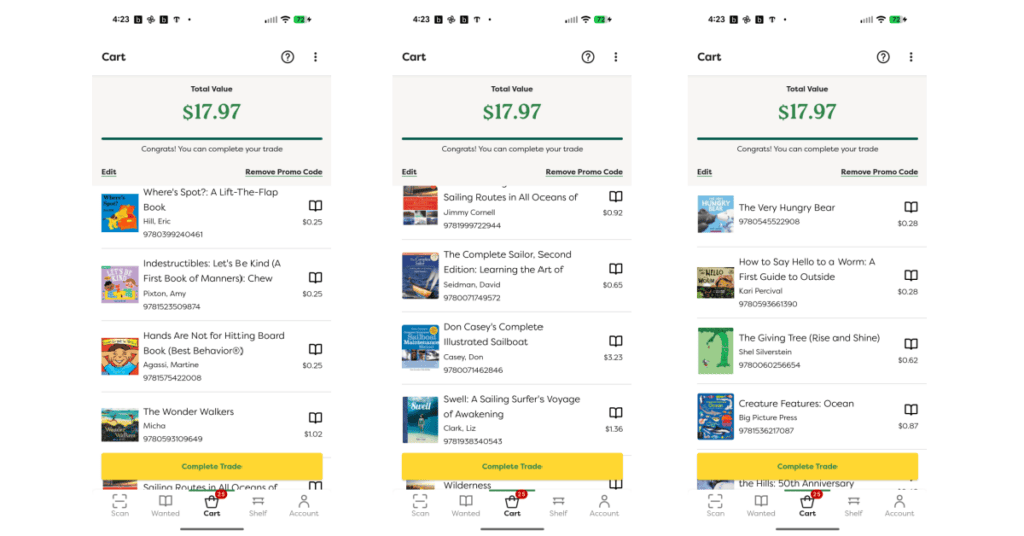
I’m going to be honest: A lot of the books I scanned were worth 25 cents to 50 cents.
For example, I scanned a bunch of kids’ books and saw offers like:
- $0.25
- $0.28
- $0.50
That’s not a lot of money, but it also makes sense. A lot of kids’ books and common paperbacks are everywhere. If a book is super common, it usually won’t sell for much.
Some books were worth more
Not every book was worth a quarter.
I noticed that books that were more “wanted” paid more, and textbooks can pay more too. So if you have old college textbooks sitting around, it’s definitely worth scanning those.
Even some random nonfiction books can sometimes pay more than you’d expect, depending on what people are searching for.
My cart total
Even though some books were only a small amount, the total can still add up when you scan a lot of them.
The total value came to $17.97 in my cart.
The app makes it easy to see:
- Each book’s offer price
- How many books you’ve scanned
- Your total
So if you’re someone who wants a fast way to see what your stuff is worth (without a bunch of work), that part is great.
How World of Books Works (Step-By-Step)
If you’ve never used a book buyback site before, don’t worry. The process is pretty straightforward.
Step 1: Download the app or use the website
You can use:
I liked the app because scanning is fast.
Step 2: Scan your books (or enter the ISBN)
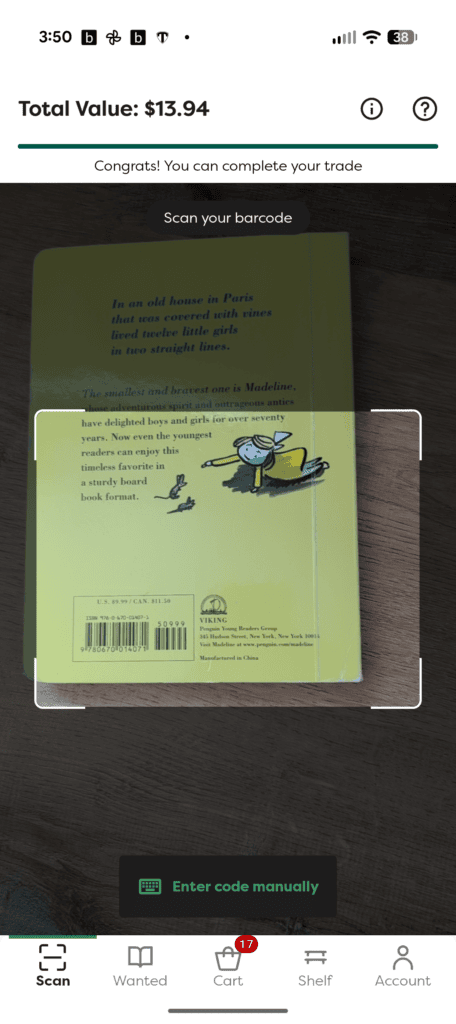
Once you’re in the app, you scan the barcode on the back of the book.
If the book is something they want, you’ll see an offer right away.
If they don’t want it, they will tell you why, such as that they already have too many of them.
I really liked how easy it was to scan a book, and then you can decide right then and there if it is worth it to you. I was able to scan around 40 books in just a matter of minutes!
Step 3: Add books to your cart
As you scan, each book gets added to your cart with:
- The book title
- The price they’re offering
And you’ll see your total value.
This is where you decide:
- Is it worth sending in?
- Would you rather donate the book, keep it, or sell it somewhere else?
Step 4: Complete your trade
When you’re ready, you finalize your trade.
This is when you choose how you want to get paid.
World of Books can pay you through bank transfer, PayPal, or check.
Step 5: Pack your books
They have packaging guidelines, and I recommend taking this seriously because books can get damaged during shipping, and you want them to arrive in good condition.
If you’re shipping books, I recommend:
- Using a sturdy box
- Packing books tightly so they don’t slide around
- Adding padding if needed
- Taping the box well
Step 6: Ship your box
World of Books gives you free shipping for trades.
You’ll just have to follow their instructions for the shipping label and drop-off.
Step 7: They inspect your books
When World of Books gets your books, they check the condition.
So if a book is:
- Water damaged
- Missing pages
- Full of writing
- Falling apart
- Badly stained
… it may not qualify, and they won’t pay you for it. Items that they do not want are not returned to you; instead, they are recycled.
This is why I recommend reading their condition guidelines here before you send your books in.
Step 8: You get paid
After World of Books processes your trade, you get paid!
What can you sell to World of Books?
World of Books is mainly for books (nonfiction, fiction, kids, textbooks, etc.), but they also buy other items, such as:
- CDs
- DVDs
- video games
The easiest way to know what they want is simple:
Scan it.
If it shows a price, they want it.
If it doesn’t, they don’t.
Pros and Cons of World of Books
Here’s my honest list.
Pros:
- Super easy scanning – This was my favorite part. I could scan books around my home and instantly see what they were worth.
- No listing or buyers – You don’t have to create listings, deal with messages, or meet strangers.
- Good for decluttering – If your main goal is to clear out shelves and get some money, this is an easy option.
- Fast decision-making – Scan → see the price → decide. It’s very easy.
Cons:
- Many books are worth very little – A lot of mine were under 50 cents.
- Condition matters – This isn’t really a con, but it is something worth mentioning. They inspect the books, so you need to be careful about what you send because you will not get a rejected book back.
Tips To Make More Money (And Save Time) on World of Books
If you want to get the best results with World of Books, here are my tips.
1. Scan everything first, then decide.
Don’t guess what’s worth money.
Scan it first, then decide if it’s worth sending.
2. Don’t bother with damaged books.
If a book is falling apart, it’s probably not worth the risk.
3. Make a “send” pile and a “donate” pile.
As you scan, put books into two piles:
- Send to World of Books
- Donate or recycle
This keeps you organized and saves time.
4. Pack your books well.
Books can get damaged during shipping.
A little extra care with packaging can help protect your payout.
Buying Used Books From World of Books
Even though this is mainly a “sell your books” review, I think the buying side is worth mentioning because it’s part of what makes World of Books different.
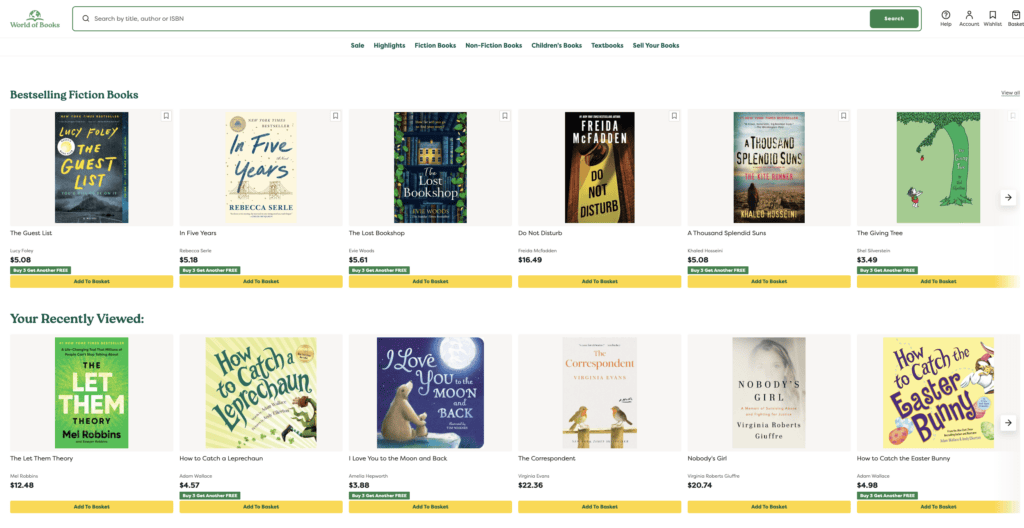
World of Books also sells used books online. I browsed what they had for sale, and I saw a lot of really great prices on books that I would definitely buy myself.
So if you’re a reader who likes to:
- Save money
- Buy used
- Shop online
… then the store side can be useful too.
You can see what books they have for sale by clicking here.
Frequently Asked Questions
Below are answers to some common questions you may have about World of Books.
How much money can you make with World of Books?
It depends on the book. You just need to reach a minimum value of $7.50 before you can complete your trade.
Is World of Books free to use?
Yes, it’s free to download the app and scan books to see the prices. World of Books also provides the shipping label. Everything is free!
Do I have to use the app?
No, you can use the website too. But the app is faster if you have a lot of books because scanning is so easy.
Do textbooks really pay more?
Yes, they usually do. Textbooks are expensive when new, and students look for used options.
Does World of Books pay for shipping?
World of Books gives free shipping for trades through FedEx and USPS. You’ll want to follow their instructions for packaging and shipping.
How do you get paid from World of Books?
World of Books pays you through PayPal, bank transfer, or check.
How long does it take to get paid from World of Books?
World of Books usually pays you within 3 to 5 business days after your items are received and processed at their warehouse.
What kind of books does World of Books accept?
World of Books buys kids’ books, textbooks, CDs, DVDs, games, fiction, nonfiction, and more, and it also depends on demand. The easiest way to know is to scan the book. If you see an offer, they want it!
What condition do books need to be in?
Books should be in decent condition. I recommend that you avoid sending books that are heavily damaged, missing pages, water-damaged, or full of writing.
What happens if World of Books doesn’t accept some of my books?
They inspect the books, so there may be cases where not everything qualifies … and they won’t pay you for it. Items that they do not want are not returned to you; instead, they are recycled. This is why reading the condition guidelines and packaging well is important.
Can you sell kids’ books?
Yes, you can scan kids’ books. Just know that many common kids’ books have low payouts.
Is World of Books worth it?
It depends on your goal. If you want the easiest way to declutter and make some money, then I think it is worth it. If you want the most money per book, you may want to try another option.
Is World of Books Legit? – Summary
I hope you enjoyed my World of Books review.
If you want a quick and simple way to scan books around your home and instantly see what they’re worth, World of Books makes that part very easy.
I liked that I could scan a barcode and see a price within seconds, without creating listings or dealing with buyers.
Just know going in that many books will be worth less than 50 cents, and that’s normal for common titles. The books that are more wanted, and especially textbooks, can pay more, so it’s worth scanning everything before you decide what to send.
If you want to try it, you can start scanning by clicking here. Also, you can use the promo code MAKINGSENSE15 to earn an extra 15% on your trades.
Do you have any questions that you’d like me to answer in my World of Books Review? Have you ever sold a used book before?
Recommended reading:
- How To Quickly Declutter Your Home and Make $500 This Weekend
- 12 Best Places To Sell Video Games
- 14 Best Places To Sell VHS Tapes For Cash
- 12 Best Places To Sell Antiques for the Most Money
The post World of Books Review: Is It Worth It To Sell Your Used Books? appeared first on Making Sense Of Cents.